Vector Seamless Patterns with Owls: A Practical Guide to Digital Paper Assets
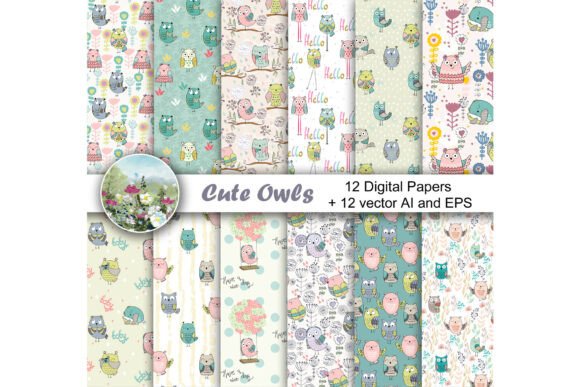
When you are looking for digital assets that combine whimsy with professional versatility, Vector Seamless Patterns with Owls offer a compelling solution. Whether you are a seasoned graphic designer, a small business owner launching a baby clothing line, or a hobbyist scrapbooker, the right background can elevate your project from ordinary to exceptional. The specific kit described here—featuring cute owl illustrations in seamless formats—is designed to save time and enhance visual appeal across a wide range of applications.
However, simply downloading a pattern is not enough. To get the best results, it is crucial to understand what you are buying, how the file formats work, and common pitfalls that can ruin your final output. This guide breaks down the essentials of working with these digital papers, helping you avoid costly mistakes and maximize the value of your purchase.
Understanding the Asset: What You Are Actually Getting
Many buyers confuse raster images (like standard JPEGs) with vector files. Understanding this distinction is vital for quality control. The kit includes two distinct types of files:
- 12 High-Resolution JPEGs: These are sized at 16 by 16 inches at 300 DPI (4800×4800 pixels). This resolution is excellent for high-quality printing on paper products, posters, and large-format displays. Because they are already rendered as pixels, they are ready to use immediately in design software like Photoshop or Canva without needing further processing.
- 12 Vector Files (AI and EPS): These are the true powerhouses of the kit. Vector graphics are made up of mathematical paths rather than pixels. This means you can scale them to the size of a billboard without losing any clarity or experiencing "pixelation." The inclusion of both AI (Adobe Illustrator) and EPS (Encapsulated PostScript) formats ensures compatibility with most major design programs, even if you do not own the latest version of Adobe Creative Cloud.
The theme itself—cute owls—is timeless. Owls symbolize wisdom but, in a cute style, they evoke warmth, playfulness, and innocence. This makes them particularly effective for niches such as nursery decor, children’s apparel, educational materials, and gift packaging.
The Power of Seamless Tiling
A key feature of this collection is that the patterns are seamless. In design terminology, this means the edges of the image are designed to match perfectly when placed next to each other. You can tile one image next to another to create a background of infinite size. This is incredibly useful for:
- Textile Design: Creating repeating prints for fabric rolls where no visible seams should appear.
- Web Backgrounds: Ensuring a page scrolls smoothly without awkward breaks in the pattern.
- Large Prints: Covering a full wall mural or a large poster board without running out of image area.
If you are new to seamless patterns, the concept might seem technical, but the application is straightforward. When you import the file into your design software, you simply set the document size larger than the single tile, and the software handles the repetition. Always check the preview mode in your software to ensure the tiles align correctly before sending anything to print.
Common Mistakes to Avoid
Even with high-quality assets, users often make errors that compromise their projects. Here are the most frequent issues and how to prevent them.
Ignoring Color Profiles
One of the biggest reasons printed designs look dull or wrong is color space mismatch. Digital screens use RGB (Red, Green, Blue) color models, while printers use CMYK (Cyan, Magenta, Yellow, Key/Black). If you order custom-printed baby clothes using an RGB JPEG directly from your screen, the colors may shift significantly upon arrival. Always convert your files to CMYK if you are sending them to a professional printer, or ask your printer for their specific color requirements. Vectors are easier to manage here because you can adjust color swatches globally before exporting.
Underestimating Resolution Needs
While the provided JPEGs are 300 DPI, which is the gold standard for print, you must consider the final output size. If you take a 16x16 inch tile and stretch it to cover a 4-foot banner, you will lose sharpness. For very large prints, rely on the vector files. Open the AI or EPS file in your vector editor, expand the artboard to your desired dimensions, and export a new high-resolution TIFF or PDF. This ensures crisp lines and smooth gradients regardless of scale.
Overlooking Licensing Rights
Before using these patterns for commercial purposes, always review the license agreement included with the download. Some digital papers are for personal use only, meaning you cannot sell products made with them. Others allow commercial use but restrict resale of the digital files themselves. Misunderstanding this can lead to legal issues or account bans on platforms like Etsy or Amazon Merch. Typically, you can sell physical goods (like shirts or mugs) featuring the design, but you cannot repackage and sell the JPEGs as stock art. Clarify this early to protect your business.
Assuming Compatibility Without Checking
While AI and EPS are widely supported, older versions of design software may struggle with complex vector layers. If you are using free alternatives like Inkscape or GIMP, ensure they support the specific version of the EPS/AI file provided. Sometimes, saving a vector file as a flat PNG after opening it in a compatible program is a safer workflow for sharing with clients who don’t have editing software.
Practical Applications and Best Practices
Once you have mastered the basics, the creative possibilities expand rapidly. Here are some practical ways to utilize Vector Seamless Patterns with Owls:
- Apparel and Textiles: Use the vector files to create repeat patterns for t-shirts, onesies, or tote bags. Ensure you flatten the vectors into a high-res bitmap before sending to a screen printer unless they specifically request vector-ready artwork.
- Stationery and Paper Products: The 300 DPI JPEGs are perfect for designing greeting cards, wrapping paper, and journal covers. The cute owl motif works exceptionally well for birthdays, holidays, and baby showers.
- Digital Scrapbooking: Hobbyists can use these patterns as backgrounds in digital layouts. Since the files are seamless, you can easily fill entire pages without worrying about edge alignment.
- Marketing Materials: Bloggers and educators can use these patterns for webinar backgrounds, slide decks, or printable worksheets. The friendly aesthetic helps reduce visual stress and engages younger audiences.
Final Checklist Before You Start
To ensure a smooth experience, keep this checklist in mind:
- Verify File Integrity: After downloading, open all 24 files (12 JPEGs + 12 Vectors) to ensure they are not corrupted.
- Check Dimensions: Confirm the 16x16 inch size meets your minimum requirements. If you need smaller thumbnails for web previews, you can safely downscale the JPEGs.
- Backup Your Assets: Store your vector and raster files in a dedicated folder. Organize them by theme or color to make future updates easier.
- Contact Support if Needed: The seller encourages questions. If you encounter technical difficulties opening the AI/EPS files, reach out. Most sellers are happy to provide troubleshooting steps or alternative formats.
By understanding the technical aspects of Vector Seamless Patterns with Owls, you move from being a passive consumer to an informed creator. You avoid the frustration of pixelated prints, licensing disputes, and compatibility headaches. Instead, you focus on what matters most: creating beautiful, cohesive designs that resonate with your audience. Whether you are making a single scrapbook page or launching a full clothing brand, these assets provide a flexible, high-quality foundation for your creativity.